
Access this page from Manage > Trainees and courses, then going to Options > Enrolled trainees or clicking on the number in the Enrolled trainees column.
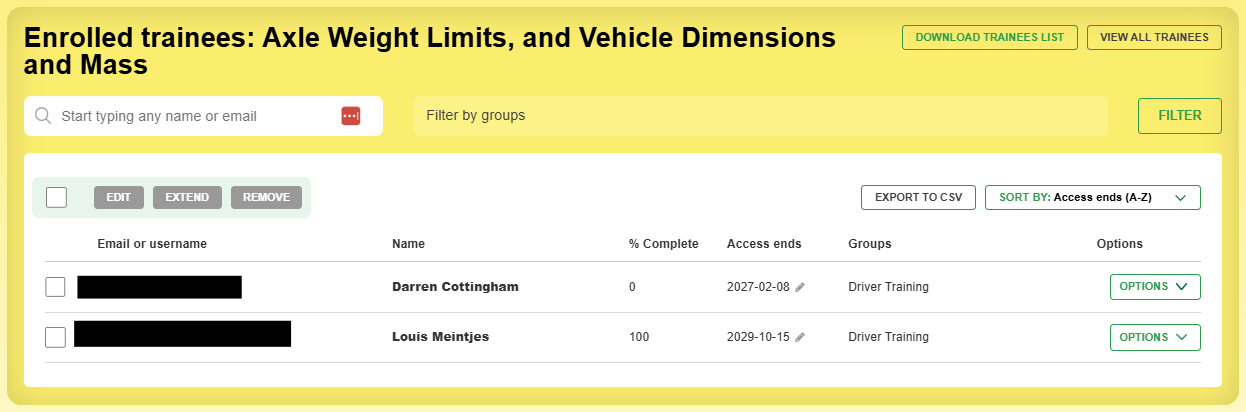
Working down the functionality from top to bottom, from this page you can:
- Download a list of all trainees across all courses
- View all trainees across all courses
- Search or filter trainees for this course by username, email and/or group(s)
- Edit, extend course access or delete one or more trainees. Read more here.
- Export this list to CSV
- Sort the list (A-Z, Name, Completeness, Access ends)
- View:
- the email or username and the name of the trainees in the courses
- their current course completion percentage is
- when their access expires
- what groups they belong to
Options menu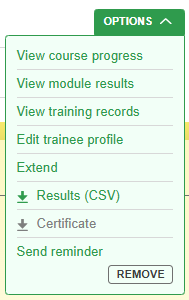
For a particular trainee:
- View their course progress (a list of modules)
- View their module results (a list of each time they tried a module and what the result was)
- View their training records
- Edit their name, password and groups in their profile
- Validate a course (if it's an operator's certificate
- Download any certificates and results files
- Send a reminder to them to finish the course (if it's not finished already)
- Remove them from the course
- Download any results or certificates relevant to the course from the options menu.