
Important things to know before you use the bulk upload
If you make a mistake with an email address or username it will use one course licence but you can undo it by logging in and deleting the trainee in question before they start. This will add the course licence back for you.
You can bulk upload trainees using the CSV template.
Download the template here. There is some sample data which you can delete, but don't delete the header row with the column names.
Bulk upload page
Click on Import trainees in the Options menu on the Trainees and courses page.

Then you will see the course selector. Choose the course, choose the file, then click Upload.
Email addresses
Trainees aren't required to have a unique email, they can have a username instead.
Note that once you have uploaded a trainee without an email, they cannot add an email to their account.
Usernames
Use only letters, numbers and full stops. Don't use any other characters. It won't work with commas, spaces, etc.
Instructions for filling out the CSV template
CSV rules
- If a trainee doesn't have a company email and you don't want to use their private email, they don't need to have an email address
- Usernames and emails must be unique in the system. Usernames cannot have spaces or special characters; firstname.lastname works well.
- Trainees can be loaded with only a username, an email address is optional.
- If a trainee you are uploading exists in a different company (i.e. they worked there and had a profile with DT), please invite them via email using the Invite via email option. If they only have a username, contact us.
- Password is mandatory and must have 12 or more characters. They don't have to be unique. Our system has a password strength tool built in. If you choose an easy password like password1234, it will be rejected. The best passwords are phrases, e.g. "driver training course"
- Groups must exactly match the capitalisation and spelling of the groups you want to add them too. E.g. if you want to add them to Auckland and Sales then you will write Auckland, Sales in the field. If you're not using groups, you must enter Default Group.
- First name and last name are not mandatory fields, but we recommend you fill them in.
Access to modules and courses will be decided by the groups that you assign the trainees to.
During the upload process, the bar will progress across the screen as the trainee's accounts are created. Please do not close the screen while this is happening.

If the process is completed, then you will receive confirmation.

Notifying trainees that don't have email addresses
If you don't have individual email addresses for your trainees they won't receive reminders or a confirmation email about their account. They won't be able to reset their password or retrieve a forgotten password; you will have to manage this for them by logging in and editing the profile.
If you do add an email into the email field, those trainees will receive a confirmation email with their account details.
Errors with importing
Errors will be given with a row number, e.g.
Trainees in the following rows in your spreadsheet already exist either in your company or with a private account: 3,4
In this case, '3,4' refers to the third and fourth record in the spreadsheet, which will be row 4 and 5.
You will get these errors if you try to upload too many trainees, upload a trainee who already exists, or don't include enough information.
If there are any errors in the file, no trainees will be imported and you will receive a notification telling you how to fix the spreadsheet.
Potential warning notifications
Please create the groups [insert list of groups], or change them in the spreadsheet to groups that exist - You are trying to upload to a group that doesn't exist. Go to Manage > Your Groups and create a group to match what's in your spreadsheet, or modify your spreadsheet to include groups that already exist.
Please ensure all passwords meet the minimum requirements - A supplied password isn't strong enough
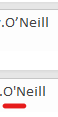
There are characters in the following cells which are not unicode: [cell reference]. Please replace or delete them. - This error is given if your spreadsheet contains a non-UTF-8 or unicode character. Most commonly, this is a curly apostrophe rather than a straight apostrophe, as you can see in this version of the name O'Neill.
[email] is not a valid email - You probably have an odd character in it, like a space or a > (this sometimes happens if you paste hyperlinked emails into Excel, rather than just pasting the text).
Bulk uploading managers
Managers must have email addresses, so you can use the Invite managers feature. Find out how here.
The course is not available or the button is greyed out
If the button is grey or the course is not listed it means you have no spare course licences. Purchase one or more course licences and try again.