
You signed up as a free user
Go to your profile. At the bottom of the page, click Request account deletion. The account will be deleted the next business day.
You are a trainee who has been assigned a course by your employer
Email your employer or the person who invited you to the course, and ask them to remove you. We won't remove you because you are not the one who has paid for the course. You can turn off email notifications in the meantime.
You bought one or more courses just for yourself
Go to Profile and click Request account deletion. Note that your access to any courses will be removed.
You bought courses for other people (e.g. a business account)
Please contact us, as your account will need to be assigned to another user if you would like to maintain your data.
You were invited as a Manager to manage other trainees
Option 1: Email your employer or the person who invited you, asking them to remove you.
Option 2: If you have the correct permissions, go to Manage > Managers, and remove yourself as a manager.
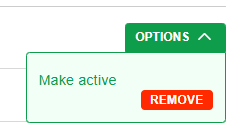
Option 3: Go to your profile > Manage companies. For any companies you don't want to be the manager of, click Options > Remove. Note that you won't be able to remove yourself from the last company, so you'll need to do either option 1 or 2 for the remainder after you've made the final one active.
If you can't get a resolution there, disable email notifications, then contact us.
Keywords: plan, renewal, cancellation, cancel, stop.