
Site settings are primarily for account holders who are inviting trainees. They mostly give permissions to managers who help manage trainees, with the exception of one option. They are explained below the image.
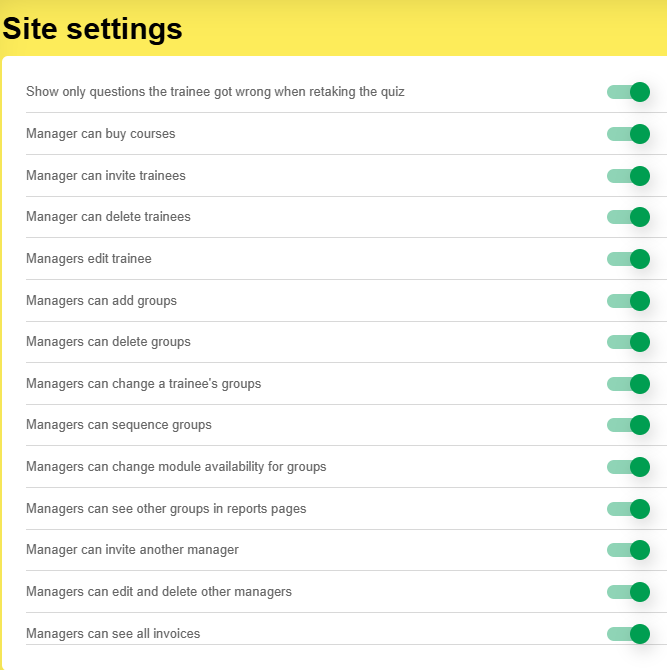
- Show only questions the trainee got wrong when retaking the quiz: this is for non-unit standard and non-learner-licence course. If a trainee gets six questions incorrect out of eight, they only have to do the two they got wrong next time.
- Manager can buy courses: gives the ability for a manager to purchase courses using whatever methods are available to your company (e.g. invoice, credit card, etc).
- Manager can invite trainees: enables a manager to add trainees via email invitation, username (form) or spreadsheet.
- Manager can delete trainees: enables a manager to remove a trainee from a course and permanently delete them.
- Managers can edit trainee: enables a manager to change the groups (see below permissions), password, first name and last name for a trainee.
- Managers can add groups: permits a manager to add a group on the groups page.
- Managers can delete groups: permits a manager to delete a group on the groups page
- Managers can change a trainee's groups: permits a manager to change a trainee's groups when editing
- Managers can sequence groups: permits a manager to build a sequence stepping through groups over time
- Managers can change module availability for groups: enables the module selector for courses for the manager to change module availability within courses.
- Managers can see other groups in reports pages: Enables a manager to compare their group(s) with other groups.
- Managers can invite another manager: Permits a manager to send an email invitation to another person to be a manager of selected groups
- Managers can edit and delete other managers: permits a manager to manage other managers
- Managers can see all invoices: if this is turned off, managers only see their own invoices.